

Foresight Technologies, iNO Mobile (M) Sdn. Bhd., Mobile Concepts (M) Sdn. Bhd. and leading navigation-and location-based services company AGIS are joining hands to unveil Singapore’s first elderly friendly mobile phone built with innovative location-determining GprX® solution.
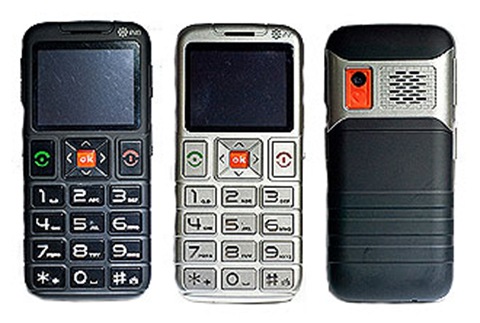
Internationally recognised as Singapore’s newest mobile phone manufacturer and system integrator that caters to the silver hair community, Foresight Technologies' complete range of elderly friendly iNO Mobile phones with their key practical functions and low cost of acquisition, are specially created for the elderly and the children of the elderly.
Commenting on the iNO Mobile F12, Mr. Kenneth Lau, Managing Director, Foresight Technologies Pte Ltd, said: “iNO Mobile phones will not only improve the lives of the silver hair group, they will set a new standard in the way we think, care and connect with our elderly parents or grandparents."
‘Innovation through the Heart’, the brand’s mission statement frames Kenneth’s vision for a Singapore brand to be innovative, functional and socially responsible all at the same time. Marked with an OLED display panel and a large keypad and buttons, the new iNO Mobile F12 comes with a 2-megapixel camera, Micro SD, dual SIM slot, FM Radio and MP3 and the emergency SOS heart button located on the back of the phone.
“Space or location as others call it, is the universal glue that connects all businesses and social activities together. Nothing happens outside space. Space and time forms a symbiolic relationship that shapes our lifestyles in both succinct and nebulous ways. With connected devices, the world is waking up to a new era of space management. Welcome to the world of “Location-Based Services!” said Associate Professor Goh Pong Chai, Chief Scientist, AGIS Pte Ltd.
This special emergency function allows an elderly person to press the SOS button located on the back of the phone, which will release a loud siren and alert the people nearby for help. At the same time, it will activate an emergency call and text message to five designated mobile numbers in its pre-programmed list. These designated recipients will receive information denoting the location of the iNO phone owner.
How to use the GprX solution provided by AGIS?
Besides the embedded SOS features, i.e. sending emergency SMS and emergency auto dial on the preset numbers – the location-based services provided by AGIS called NAVFZone can be activated using the SMS commands. To have a better accuracy of location information feedback to the recipient, user are advised to use the Celcom network.
3 simple steps to setup and use the AGIS LBS on iNO Mobile F12:
- Register – Insert a Celcom SIM card into the F12 SIM 1 and send SMS by typing gxsos<space><the controller mobile number> i.e. gxsos 0193120000 to 0193986708 (*Credit pre-loaded on new registration are 25 only)
- Add SOS contacts – Send SMS by typing gxadd<space><mobile number> i.e. gxadd 0122134567 to 0193986708 (repeat the step 2 to add more numbers, max. 4 contacts)
- Use the SOS – Press and hold the SOS button (at the back) for 7 seconds
Note: You will have a total of 25 credits upon a successful registration. Each SMS commands sent to 0193986708 and SOS contacts requires credits usage (gxadd, gxdel, gxhello and SOS).
More information on the iNO Mobile F12 and AGIS GprX.
If you’re a Twitter user, don’t forget to follow MCM @mcmsb on Twitter.
 In addition, the headset is easy to use thanks to a multifunction button that controls power, pairing, picking up and ending calls. The device also features a micro-USB charging socket and a status indicator light that shows when the headset is connected or low on battery power.






 Sony Ericsson has just announced a clever new device recently which lets you control some of your Android phone features remotely. This tiny sub-display, for remotely-controlling your Android smartphone and sneaking glances at incoming messages when you probably should be paying attention in class, in meetings or in the midst of romantic dinners.
  Measuring in at 35 x 35 x 11 mm, the plastic-bodied LiveView™ is a lightweight if somewhat thick black square, fronted by a 1.3-inch 128 x 128 colour OLED display. On the back there’s a metal clip, sturdy enough to keep the LiveView™ fixed snugly to your lapel or the shoulder-strap of your bag; Sony Ericsson also supply a nylon wrist-strap and a plastic frame assembly to turn the LiveView™ into a chunky watch. Hardware controls are limited to a power button with integrated multicolour LED on the top left corner and a second button on the top right; on the bottom edge there’s a microUSB port for charging, covered with a somewhat fiddly rubber flap.
  As far as notifications go, the LiveView™ vibrates and flashes an icon at the top whenever new items arrive, and you'll also see the number of new items indicated above the corresponding app icons. You can tweak the update frequency -- from every 15 minutes up to every 3 hours or never -- and select sources in the phone's app, but there's no giant sync button to feed your LiveView™ straight away. More disappointingly, the apps only show you alerts as they come along, rather than letting you browse through, say, upcoming calendar events or old text messages that arrived when the LiveView™ app was closed. Okay, maybe the text messages aren't essential, but we think it'd be super useful to have a more powerful calendar app on the LiveView™, considering how often we access the calendar while on the move.
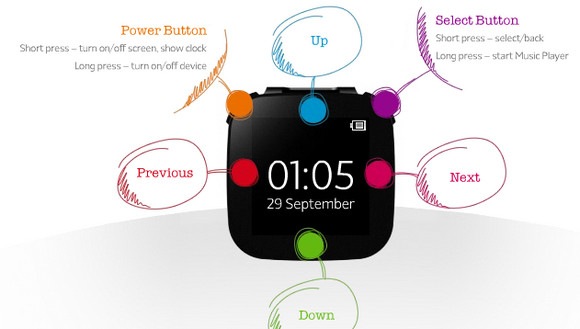 Navigation, felt more convoluted than it should be. The menu layout should be straightforward – cycle through the top level of Sony Ericsson’s native apps with the left/right touch keys, select with the right-hand physical button and then move up and down lists of RSS headlines or missed calls with the up/down keys – but all too often presses would fail to be recognized. We also found the LiveView™ would often stall, refusing to back out to the main menu and instead leaving us either looking at a blank screen or simply the status bar of time and battery life.
 Sony Ericsson deserves credit for the concept and flexibility with a range of Android devices, and the price – at around what you’d pay for a mid-range Bluetooth headset – is considerably less than the company’s earlier Bluetooth watches. Unfortunately the day to day experience simply doesn’t live up to the promise but don’t worry, this review is based on a prototype unit. Sony Ericsson also has confirmed that the LiveView™